Showing posts with label copyright. Show all posts

Monday, April 9, 2012

E-Portfolio Assignment

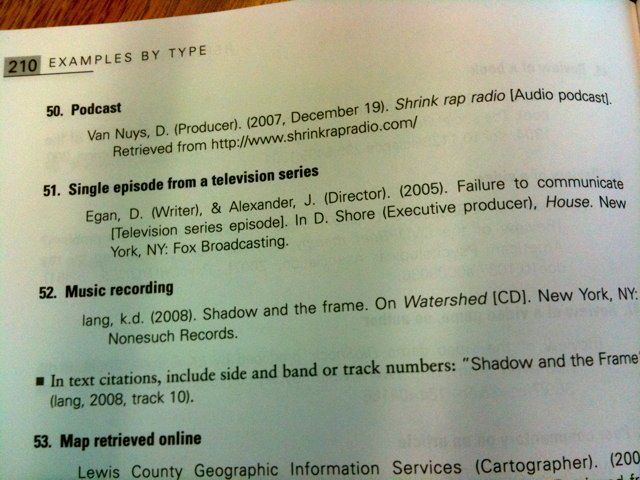
Shrink Rap Radio (2012). APA Style Manual [Image], Retrieved, April 9 2012,  from: URL http://www.shrinkrapradio.com/about/shrink-rap-radio-in-the-apa-style-manual/


I've had some more questions about the E-Portfolio which is due on the last day of class (the 13th of April).


  • NO you do not need to include a Delicious tag cloud. Delicious no longer supports this and your assignment does not ask you to do this. Please make sure you are looking at the current assignment (and not last term's one): found here.
  • Your final reflective blog post means I am looking for you to tell me about your learning throughout the term. You can disagree with using Facebook, LinkedIn, blogs, Twitter etc...BUT tell me why. Use examples to support your analyses. I am looking for you to show me your critical thinking; why you are thinking the way you do. Use examples, use resources, refer to class content and readings
  • In your final reflective blog post PLEASE remember to include the links to your FIVE comments that you have made throughout the term
  • YES even if you are including photos that you took (so there is no copyright issue) you MUST still include a caption/reference noting all the pertinent information following APA style

Again, if you have any questions, don't hesitate to e-mail me.

I'm including the assignment information below too:


ALES 204 E-Portfolio Term Project
Total Value: 35%

As we proceed through the term your writer’s toolbox will grow.  Blogging for this class will help you not only keep track of what you’ve been learning but it will also give you a space to stretch your communication muscles. Communicating well in various modes, text, image and sound are part of this class’s learning outcomes that you can practise in your own blog posts.
This term assignment is not really about specific instances of “science.”  Rather, this assignment is an opportunity to make broad observations of kinds of scientific knowledge and professional composition in relation to what we’re learning in the class.  You do not have to write a blog post for every single class that we have.  You must do at least five posts and two side-bar widgets.  In most instances I WILL assign you a blog post topic (such as the Introductory blog post and the final reflective post) – that will count as your E-Portfolio – but you will have the opportunity to choose ONE topic AND, if you wish to write any extra posts, those topics will be also be your choice (though they must be related to class content).  With this E-Portfolio you have a chance to participate in an online environment that is becoming increasingly important for the future; both in education and employment.  

At the end of the term, you will have written at least five blog posts.  In each blog post you must:
  1. Include at least one image
  2. Include at least one external link (somewhere out in the WWW)
  3. Include at least one reference to a fellow student’s blog post (you must link to the post, i.e. internal link)
  4. Be on topic (i.e. related to our class work).
  5. Each blog post should be at least two paragraphs but no more than four.

Additionally, throughout the term you must comment on at least five blog posts written by fellow students in this class. You can find links to the students’ blogs on the class blog, under the Module 2 blog post.

Comments, like all the writing and interaction in this class, must remain appropriate in level (writing style, mechanics and punctuation) and collegiality.  In your final blog post for this project you will need to include links to the five (or more) comments you made.

Mandatory Blog Post Topics
  • Module 2: Introductory Blog Post
  • Module 3: Embed the Flickr photo of your paper (or online) Facebook profile.
  • Module 10: Wikipedia stub entry (not required for CSL students)
  • Module 10: Optional Post (only for CSL students)

Additional E-Portfolio entries include (to be completed by the end of the term, 13th April.):
  • Embed your Twitter feed in the sidebar of your blog.
  • At least ONE blog post on a topic of your choice
  • Reflective blog post. Please add links to your FIVE comments here on your final reflective blog post.

Important Elements to Note:
1) All related links, images, audio and any other multimodal device must be appropriate, and you must CITE the reference information using APA style, even if the images are your own work.
2) The internet and computers can have hiccups. Save, save, save your work.  
3) Use your writer’s toolbox in your blogs – there’s no excuse for forgetting to capitalise, incorrect punctuation and txt spk (unless that is part of the assignment).
4) Remember to label your posts appropriately.
5) This is an individual project.  You are to write each blog post on your own. There is opportunity to collaborate by commenting on other blog posts.

Note on Computer Access:
You will have the chance to write blog posts on your own time and by using any of the computers available at the University of Alberta campus.  As a class we now have all lab sessions in computer labs during which there may be opportunity to craft a blog post.


Due Date: 13th April 2012, 17:00


Wednesday, March 14, 2012

Lecture 22: Canadian Copyright Law & Remix Culture

In class we will watch a portion of this video: A documentary by Brett Gaylor about Copyright and Remix Culture. I have a feeling many of you will want to watch the complete film so here it is:


Monday, March 12, 2012

Lecture 21: Flickr, Creative Commons & Copyright

Reminder: Online Class Today!

Please follow along through the lecture and complete any tasks (especially the quiz at the end!)

Please note: the lecture powerpoint was too big for slideshare so make sure you look at BOTH presentations!


Quiz:

Tuesday, February 28, 2012

APA Style Reminder

As everyone knows, for the e-portfolio it is very important to cite all the images you include - even if you took the images yourself! Your reader won't necessarily know that and it's important to get into the habit of crediting work in an academic context.

We will have more in depth lectures on APA style but it is very simple and an excellent resource is the OWL Lab at Purdue which you can find here.

You will need to use APA style for all sorts of referencing but here is a bit about how to reference images (as figures!):


Drawings and photographs can be used to communicate very specific information about a subject. Thanks to software, both are now highly manipulable. For the sake of readability and simplicity, line drawings should be used, and photographs should have the highest possible contrast between the background and focal point. Cropping, cutting out extraneous detail, can be very beneficial for a photograph. Use software like GraphicConverter or Photoshop to convert color photographs to black and white before printing on a laser printer. Otherwise most printers will produce an image with poor contrast.

This image shows a picture of a bathroom.
Photograph

Preparing Figures

In preparing figures, communication and readability must be the ultimate criteria. Avoid the temptation to use the special effects available in most advanced software packages. While three-dimensional effects, shading, and layered text may look interesting to the author, overuse, inconsistent use, and misuse may distort the data, and distract or even annoy readers. Design properly done is inconspicuous, almost invisible, because it supports communication. Design improperly, or amateurishly, done draws the reader’s attention from the data, and makes him or her question the author’s credibility.
The APA has determined specifications for the size of figures and the fonts used in them. Figures of one column must be between 2 and 3.25 inches wide (5 to 8.45 cm). Two-column figures must be between 4.25 and 6.875 inches wide (10.6 to 17.5 cm). The height of figures should not exceed the top and bottom margins. The text in a figure should be in a san serif font (such as Helvetica, Ariel, or Futura). The font size must be between eight and fourteen point. Use circles and squares to distinguish curves on a line graph (at the same font size as the other labels). (See examples above.)
Captions and Legends
For figures, make sure to include the figure number and a title with a legend and caption. These elements appear below the visual display. For the figure number, type Figure X. Then type the title of the figure in upper and lowercase letters. Follow the title with a legend that explains the symbols in the figure and a caption that explains the figure:

Figure 1. How to create figures in APA style. This figure illustrates effective elements in APA style figures. 
Captions serve as a brief, but complete, explanation and as a title. For example, “Figure 4. Population” is insufficient, whereas “Figure 4. Population of Grand Rapids, MI by race (1980)” is better. If the figure has a title in the image, crop it.

Wednesday, January 18, 2012

Stop SOPA


In the lecture this morning, we will address SOPA and what it might mean for us as internet users and content creators.


STOP SOPA Code Turns Any Site Dark to Protest Stop Online Piracy Act


stop sopa image
Sites such as Wikipedia and Reddit are going “dark” this Wednesday, Jan. 18, to protest the Stop Online Piracy Act (SOPA) which, critics contend, would compromise the ability of any site that includes outside links to carry on current operations.
Feeling left out? A simple piece of code is helping the entire web (from major sites to even the humblest of Tumblrs) go dark in solidarity. The code, called STOP SOPA, replaces any site’s landing page with a black screen. Using your mouse a flashlight uncovers a message explaining the need to kill SOPA and a link to anti-SOPA site AmericanCensorship.org.
SEE ALSO: On the Street: Do You Understand SOPA? [VIDEO]
The idea of “Going Dark” is a worst-case scenario protest against SOPA, essentially warning that link-heavy sites such as Reddit and Wikipedia might get shut down, or go dark, if SOPA becomes law.
The STOP SOPA code was created by Zachary Johnson, a developer and Internet enthusiast, out of anger:
I’ve been calling my representatives in Congress, but this gave me another outlet for my frustration with this legislation. I place this code in the public domain. I require no attribution.
You can find the code here and get a sense of what sites will look like before and after application. Make sure you don’t add it until Jan. 18, otherwise your site will prematurely go dark.


Via The Guardian:


Stop Sopa or the web really will go dark

The corporations lobbying for Sopa know exactly what they want: control of online information for profit. This is a crossroads

• See the Guardian's explainer: understanding Sopa
Jimmy Wales
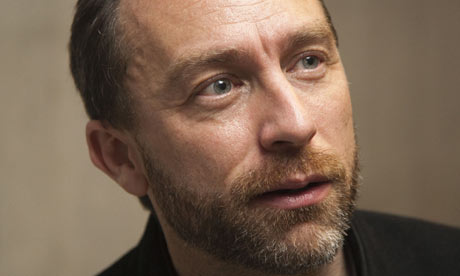
Jimmy Wales announced that Wikipedia will be switched off on 18 January in protest against Sopa and other legislative efforts to control and censor the internet. Photograph: PR handout
As thousands of websites, including the English version of Wikipedia, prepare to "go dark" Wednesday in protest against internet censorship, a new explanation is emerging for the would-be censors' acts: they simply don't understand how the internet works. The evidence suggests otherwise.
Search on the these terms – "don't understand" Sopa Congress – and you'll find a lots of blogposts and news stories making this point. Sopa, of course, stands for the Stop Online Piracy Act, which may or may not be stalled at the moment.
Change "don't" to "doesn't' and "Congress" to "Rupert Murdoch" in that search and you'll find a bunch of new ones stemming from Murdoch's spate of Tweets over the weekend, in which he denounced Sopa opponents and took special aim at his longstanding object of loathing, Google. Two of the resulting "he doesn't understand" pieces came from people whose work I greatly respect: see this post at the Guardian by Jeff Jarvis, and this one by Mathew Ingram at the GigaOm technology blog.
Read the entire article here.